Showing posts with label 3D. Show all posts

Monday, October 17, 2016

3D Class Working in a Game Engine With Final Prop


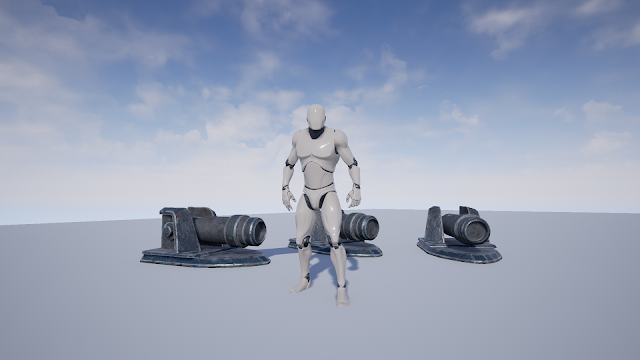
For this week, we export out texture maps from substance painter. Then we bring in low res model and textures to UE4.


In substance painter, there is a UE4 preset for exporting textures.


Here, I set up the material for the cannon.


Then I create material instance for cannon.


This is the final shot.

Friday, October 14, 2016

3D Class Week 07 Bake Maps and Digital Painting for a Prop


This week we learn about substance painter. It is my first time using this program. Substance painter is very powerful 3D painting program which allow you to bake maps, texture and render your work.


I begin with export out obj files from maya file provide by our teacher.

Here is low Res version of the Cannon.


Here is high res version of the Cannon


Then I bring the low res model into substance painter and bake the map with high res model.


Here, I begin painting and texturing my model using layers and layer mask in substance painter. It is very much like photoshop and maya combine.


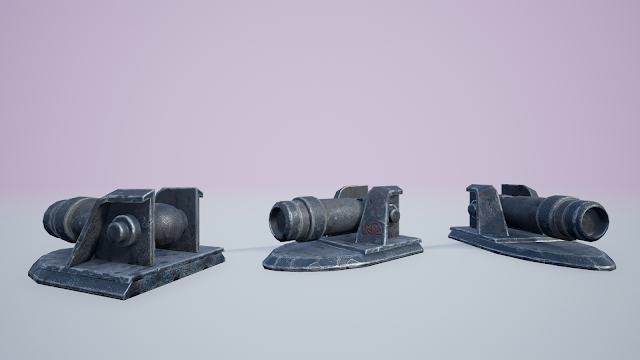
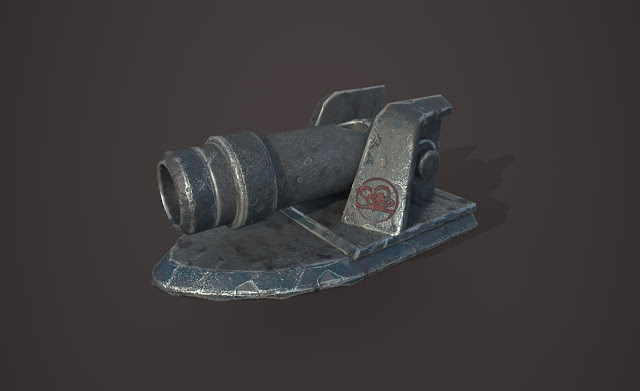
This is my final result rendered using substance painter. I've learn so much through this assignment. I will keep learning and practicing. 

Time spend: 5 hours.

Monday, October 3, 2016

3D Class Week 06 UV and Digital Sculpting for a Prop


3D Class Week 06 UV and Digital Sculpting for a Prop

This week, we are taking our cannon to next level.

In Maya, I create a clean UV layout for cannon model


I apply a checker material for checking the the UVs.


I added more geometry to the edges to make a high resolution model.

Cannon modeling in smooth preview.

Then I convert the smooth preview to polygon.

Bring cannon model into zBrush for some detailing work.


Monday, September 26, 2016

3D Class Week 05 Modeling A Prop


3D Class Week 05 Modeling A Prop 


For this week, the assignment is modeling a simple prop.


First thing I did is setting up right scale and making sure my top image plane match my side image plane.


My favorite part: Modeling.


Here I throw in some lights in Maya and did a quick render.

 
Push my model to ue4.


Time spend: 1.5 hours


Wednesday, September 14, 2016

3D Week 04 Lego Project Part 02


 Lego Project Part 2


For our 4th week project, our whole class is going to make a Lego level together as a team. There are four sub teams: Character Team, Transportation Team, Aircraft Team and Environment Team. I am in transportation team with Doug, Connor, Moss, Francisco and Michael. I think every single one of us is Awesome!!!!
 
Just like our previous Lego project, we begin with modeling our single pieces. I choose to do a steer-wheel.


This is my high Res model below.


This is my low Res model below.


We learn how to do LODs for UE4 meshes.


I also go back and make a lower mesh version for the z-shape blocks I did last week.


The whole class as a team, we expand our Lego library for this project. We have more pieces to use.


At the same time, we learn about perforce for source control in Tech Art class. I set up our project structure in perforce for this project.


I am in transportation team. We did some research and brain storm some ideas about what to do. Here are some reference images we find very inspiring. We also talk to environment team to make sure we all on the same page.


After we had some basic idea, we begin build some prototype with real legos. The images below shows a part of our vehicle build by Doug.


After a quick group meeting, we decide to split into two small group. Each sub group is going to make one vehicle. 
I am in charge of making the front part of the vehicle.

I went through some trial & error.


This is something I am happy with. I hand this over to Francisco to continue the backside and legs. Then Moss is building all the accessory and weapons.


This is the final result of our teamwork.


Mean while, Micheal, Doug and Connor work on the other vehicle below.


Finally, we convert our vehicles into blue print to use in the environment.


All 24 of us in the class contribute to the final level. The environment team did a great job making great environment and putting everything together. Leah light the final scene in UE4.


Time spend: 17 hours